the platform

Find, understand and act on your market.

Everything you can do once the data is consolidated: search across channels in one query, open a full profile, save an audience and re-run it on fresh data, and move it into your systems.

Advanced search 3 rules illustrative
Channels Insurance BD / RR RIA / IA
License status is Activerule 1
Business state is any of TX, CA, FLrule 2
Lines of authority include Liferule 3
128,904records match See it live
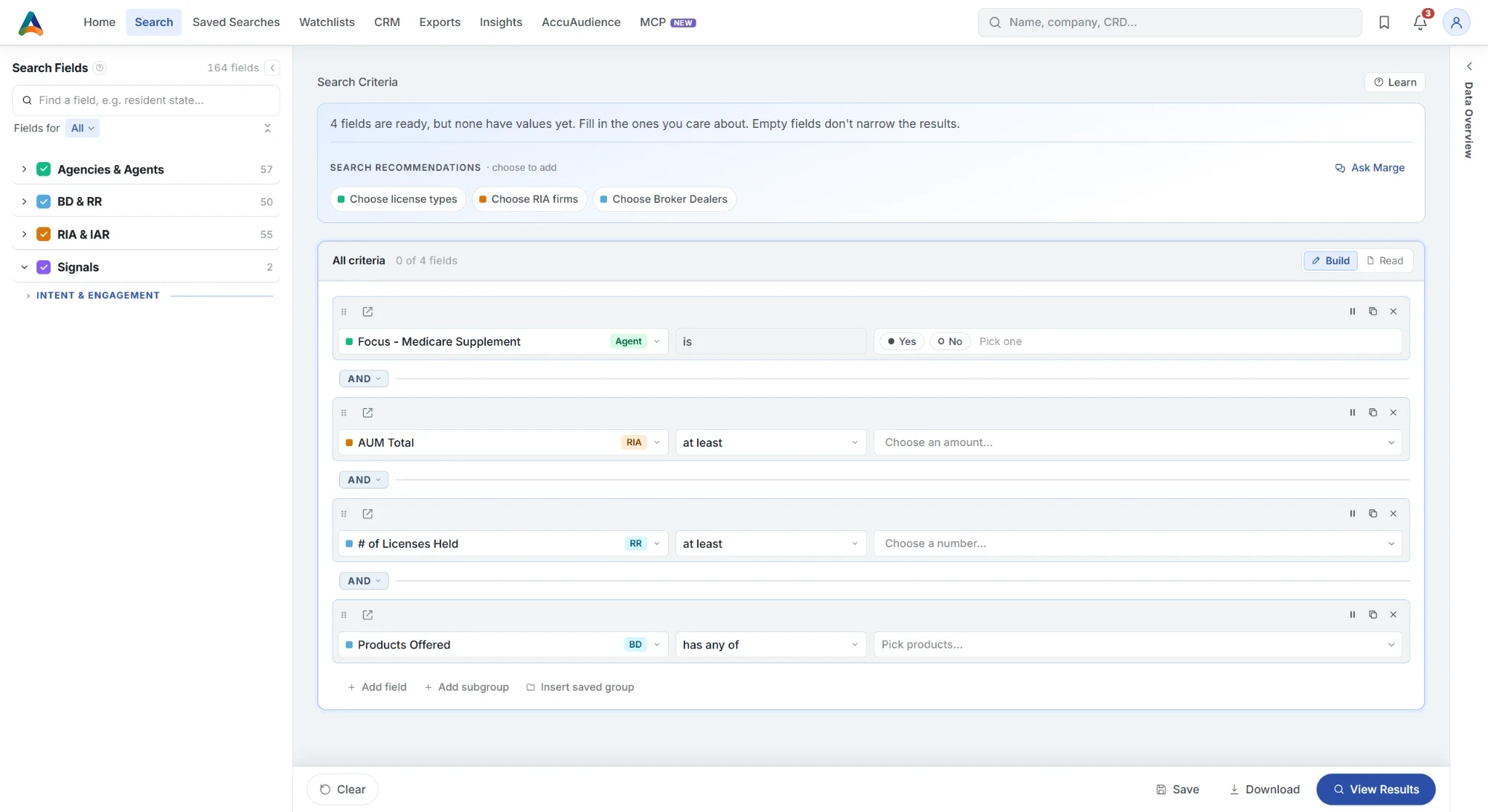
The Accupoint search builder: the Search Fields catalog beside search recommendations and four rules across insurance, Broker Dealer and RIA fields

Actual product UI.

search

Your entire market, one workspace.

Agent, Agency, BD, RR, RIA and IA share a single builder. A multi-registered professional or firm is available in one search and appears on one screen, or in one download.

One query, three channelssearch
Lines of authority, carriers, license statusAgents / Agencies
Exams, registration history, employmentBD / RR
AUM, client types, fee typesRIA / IA

Search every channel at once

Pull a license field from one channel and an AUM field from another into the same search, with a count that updates as you build.

Ask Margeillustrative
Advisors at RIAs over $500M in Florida
→ 2 filters
Firm AUM is greater than $500,000,000
Business state is FL

Ask in plain English

Describe who you need. Marge™ builds the filters, shows what it understood, and leaves every rule editable.

beyond search

Open a record. Keep an audience. Put it to work.

Everything after the search: shareable profiles, audiences that refresh with new data, and delivery that fits your team.

Profiles with direct links

Share any person or firm's profile with your team, including licenses, registrations, firm history and contact information such as email, phone and LinkedIn.

  • One profile per person and per firm, across their channels
  • Copy the link and send it to a teammate
  • Emails and phones tagged by the channel they came from
What is on a record

Deep research in one click

Reads public regulator documents and the web, then returns key facts with their sources.

  • Start it from any person or firm profile
  • Key facts, each with the source it came from
  • Read the sources yourself before you reach out

Saved searches that refresh with new data

Save your criteria, re-run it against fresh data, see how the count has changed since the last run, and share it with your team.

  • See the change in the count since the last run
  • Shared with your team, so everyone works from the same criteria
  • Push the results to your CRM manually, daily or weekly
See CRM integrations

Watchlists

Keep the people and firms you want to track in one place, and revisit them as the data changes.

  • People and firms side by side
  • Open any profile straight from the watchlist
  • Come back to it after each data update
See it in a demo

Exports your way

Choose your columns, customize your headers and save your template, then download a file or push it directly to your CRM.

  • Choose the columns and rename the headers
  • Save the template and use it again
  • Download a CSV, or push the records to your CRM
See every delivery option

Enrichment and movement reports

Upload your records and match them by CRD, NPN, email, phone number or name, then append license status, firm information and contact details. Our team can also add licenses, LinkedIn and more, and provides current and historical advisor and advisory firm movement reports.

  • Match your file by CRD, NPN, email, phone or name
  • We add licenses, firm, email, phone and LinkedIn
  • Firm and advisor movement reports, run by our team
Talk to our team
how it works

From first search to your CRM, in five steps.

  1. 01

    Search

    Find precisely targeted professionals and firms.

  2. 02

    Analyze

    See contact coverage, the channel mix and where they are.

  3. 03

    Build

    Save searches, result views and watchlists you can re-run.

  4. 04

    Export

    Download the fields you choose, with your own headers.

  5. 05

    Integrate

    Push to your CRM, or connect the API, MCP or a feed.

capabilities

Reach people. Connect your systems.

Contactability

Emails, phones and addresses, tagged by source channel, so you know how reachable an audience is before you commit.

API options

Programmatic search, matching and enrichment. Our team confirms supported endpoints and access for your account.

MCP preview

Ask Accupoint from Claude or ChatGPT, signed in with your own account, read-only.

Walk your team through it live.

We'll build a real query based on your profile and objectives, and show the records that come out the other side.